Hi Everyone ,
I have a piece of a Java code very useful for those who can't change their system sleep settings to NEVER
Sharing you an easy work around ! Hope it helps ..
What is the below code doing ?
Answer: Below code is basically changing the cursor location to and fro in a continuous loop. In between every iteration in a loop there is a timedelay. Timedelay is a user input which is required at the starting of this program. As per the Timedelays ( ms ) provided from user, code will wait for some time in between of every iteration. Lets say user provided 3000 as an input , so code will wait for 3 seconds and re perform the mouse move task
Code Hierarchy :
Its a simple code , MouseMoveclass field timedelay is made private ( I dont want any other class to access or change the variable )
Created an explicit Constructor which has arguments ( This argument will inturn initiate private field timedelay ). Constructors in java are used to initiate the fields and methods , and so am i doing ...
Created a method mousemovefunc() which includes:
Robot class instance --- used for mouse actions
Finally a main function which includes :
Scanner class instance to get user value. This user value is used while class instance is made
Code :
package mousemovepackage;
import java.awt.MouseInfo;
import java.awt.Robot;
import java.util.Scanner;
public class MouseMoveclass {
private int timedelay;
public MouseMoveclass(int val){
this.timedelay = val;
System.out.println("Thanks ! Timedelay updated to "+ String.valueOf(timedelay) + "ms");
}
public void mousemovefunc() throws Exception{
Robot myinstance = new Robot();
while(true){
myinstance.delay(timedelay);
java.awt.Point pobj = MouseInfo.getPointerInfo().getLocation();
myinstance.mouseMove(pobj.x+2, pobj.y);
myinstance.delay(2000);
myinstance.mouseMove(pobj.x-2, pobj.y);
}
}
public static void main(String[] args) throws Exception {
System.out.println("Please enter the time delay(ms): ");
Scanner sc = new Scanner(System.in);
int value = sc.nextInt();
MouseMoveclass Mouseinstance = new MouseMoveclass(value);
Mouseinstance.mousemovefunc();
sc.close();
}
}


I have a piece of a Java code very useful for those who can't change their system sleep settings to NEVER
Sharing you an easy work around ! Hope it helps ..
What is the below code doing ?
Answer: Below code is basically changing the cursor location to and fro in a continuous loop. In between every iteration in a loop there is a timedelay. Timedelay is a user input which is required at the starting of this program. As per the Timedelays ( ms ) provided from user, code will wait for some time in between of every iteration. Lets say user provided 3000 as an input , so code will wait for 3 seconds and re perform the mouse move task
Code Hierarchy :
Its a simple code , MouseMoveclass field timedelay is made private ( I dont want any other class to access or change the variable )
Created an explicit Constructor which has arguments ( This argument will inturn initiate private field timedelay ). Constructors in java are used to initiate the fields and methods , and so am i doing ...
Created a method mousemovefunc() which includes:
Robot class instance --- used for mouse actions
Finally a main function which includes :
Scanner class instance to get user value. This user value is used while class instance is made
Code :
package mousemovepackage;
import java.awt.MouseInfo;
import java.awt.Robot;
import java.util.Scanner;
public class MouseMoveclass {
private int timedelay;
public MouseMoveclass(int val){
this.timedelay = val;
System.out.println("Thanks ! Timedelay updated to "+ String.valueOf(timedelay) + "ms");
}
public void mousemovefunc() throws Exception{
Robot myinstance = new Robot();
while(true){
myinstance.delay(timedelay);
java.awt.Point pobj = MouseInfo.getPointerInfo().getLocation();
myinstance.mouseMove(pobj.x+2, pobj.y);
myinstance.delay(2000);
myinstance.mouseMove(pobj.x-2, pobj.y);
}
}
public static void main(String[] args) throws Exception {
System.out.println("Please enter the time delay(ms): ");
Scanner sc = new Scanner(System.in);
int value = sc.nextInt();
MouseMoveclass Mouseinstance = new MouseMoveclass(value);
Mouseinstance.mousemovefunc();
sc.close();
}
}
How to Create a Runnable Jar and create a One click Solution which can run one any machine ?
Follow below Steps :
Right click on the project > Click on Export :

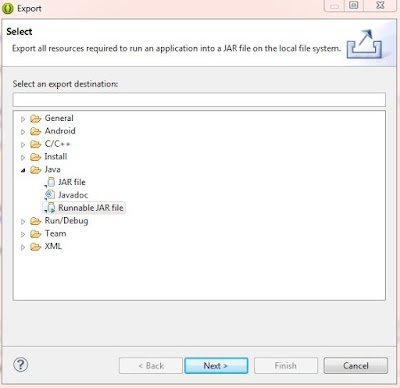
Click on Runnable JAR file > Next

Select Launch configuration and Export destination and hit Finish

Finally we will get a jar file of 2KB approx . Place this file in a folder lets say "MouseMove"
Create a bat file ( Lets say setup.bat )
Edit this bat file with below code :
@Echo Off
Set "JV="
For /F "Tokens=3" %%A In ('java -version 2^>^&1') Do If Not Defined JV Set "JV=%%~A"
If /I "%JV%"=="not" (Echo Java is not installed) Else Echo Java Version "%JV%"
TIMEOUT 5
java -jar C:\MouseMove\MouseMoveSoftware.jar
Pause
Code is almost done , We just need to double click setup.bat in any machine and that's it !!!
Happy Coding !!!!


